JH Datacenter Change
Overview
This document details the changes that were made for the new JH datacenter connection.
Maintenance Notice: SymXchange Restart & F5 IP Updates
As part of our ongoing infrastructure improvements, we have added new F5 IP addresses to the SymXchange instances supporting your integrations. To ensure these changes take effect and resolve recent connectivity issues, a scheduled SymXchange restart will occur during this weekend’s maintenance window. What’s Changing
- New F5 IP addresses have been whitelisted for SymXchange instances.
- The SANDBOX servers are down today for scheduled maintenance.
- SymXchange will be restarted during maintenance to apply these updates.
- Affected Fintechs may have experienced 403 errors due to the recent IP changes. This restart is expected to resolve those errors and restore normal connectivity.
Jack Henry™ Changes
JH Datacenter domain for SymXchange™ connections is changing from ease-symx.com to ease.jackhenry.com.
SymXchange™ communication is now over port 443.
A new wild card certificate (*.ease.jackhenry.com) will be used.
The new host name will be resolvable in public DNS.
- If testing does not result in resolution, please wait until 10/31. If the issue persists after that date, email Developer Relations.
- To test in advance, add a DNS entry in the Fintech environment to resolve the new host name to 52.128.112.49.
A unique host name will be used for each SymXchange™ connection to the JH datacenter.
- CUSTID--<PROD or SANDBOX>-<SYM #>--.ease.jackhenry.com
- FI Number is an internal JH identifier for the financial institution
- PROD or SANDBOX refers to Production or Test environment
- SYM # is the SYM number on the JH Server
- Instance Name is the name of the Instance
- Internal JH Port is the Port number used within the JH Network
SymXchange™ endpoint address no longer includes a port number.
- Old: https://:/SymXchange/?wsdl
- New: https://<hostname/SymXchange/?wsdl
Fintech Consideration
The following must be completed prior to the test:
- Outgoing traffic to the new endpoint and domain name must be allowlisted through your network.
- Incoming traffic for receiving responses from the new JH endpoint must be allowlisted.
- JH must have the IP address for the machine that will be making the connection to the new endpoint.
Testing the Connection
The connection to the new URL should present you with a WSDL page.
- Open a new instance of a web browser (any kind).
- Copy and paste the domain name into the browser’s URL bar.
- Prefix it with https:// and append the very end with /SymXchange. The URL should appear as so:
If the WSDL page appears, (similar to the image below) then the test was successful.
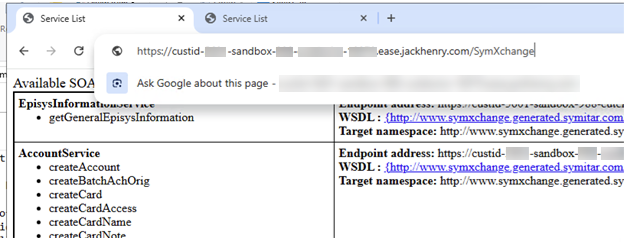
- Confirm with JH to ensure that the correct endpoint was reached.
- Have a how-to question? Seeing a weird error? Get help on our collaborative Discourse page.
- Register for the Developer Office Hours where we answer technical Q&A, in real time, from the audience.