Getting Started
Introduction
Here you’ll find everything you’ll need to get started with ODI - example usage scenarios, links to comprehensive documentation, and guidance on the development process.
Example ODI Workflow
In practice, Silverlake, CIF2020, and Core Director are the most common ODI data providers. For those three core systems, the process begins when an individual institution runs End of Day (EOD) or End of Week (EOW) processing. During EOW processing (typically on Sunday), core creates full set of data extracts and sends them to ODI. Files generated during EOD processing (Monday-Friday) contain daily delta info.
ODI processes these files first‑in, first‑out. When ODI receives the Sunday full files, it wipes the underlying database and reloads with the new data set. Daily delta files are appended to the existing data. That process is repeated on a weekly basis.
After initial processing, ODI will make the resulting data available to consumers in one of two ways: through SQL views or .CSV output files. At present, access to SQL views is limited to Jack Henry internal consumers only. Third‑party consumers can still receive the same core extract data via .CSV file output. Files can be picked up by the consumer from our secure FTP site or sent to an endpoint on your network.
New consumers will receive delta data from ODI, where “delta” refers to changes within the ODI database. Because the ODI database is reloaded and appended each week, consumers will effectively receive full data after Sunday’s processing and delta data for the remainder of the week.
When ODI creates new data output for a consumer, it publishes an Enterprise Event System (EES) 50040 “Data Ready" event. Receiving this event is not required for ODI consumers but can be useful as a process trigger to retrieve data files. See the EES Overview page for more information on EES services.
Due to factors like core EOD timing, extract file size, and order or receipt, timing for consumer-ready data will vary.
Please review the ODI Consumer Interface Guide for more in-depth information on accessing ODI data as a consumer.
The Development Process
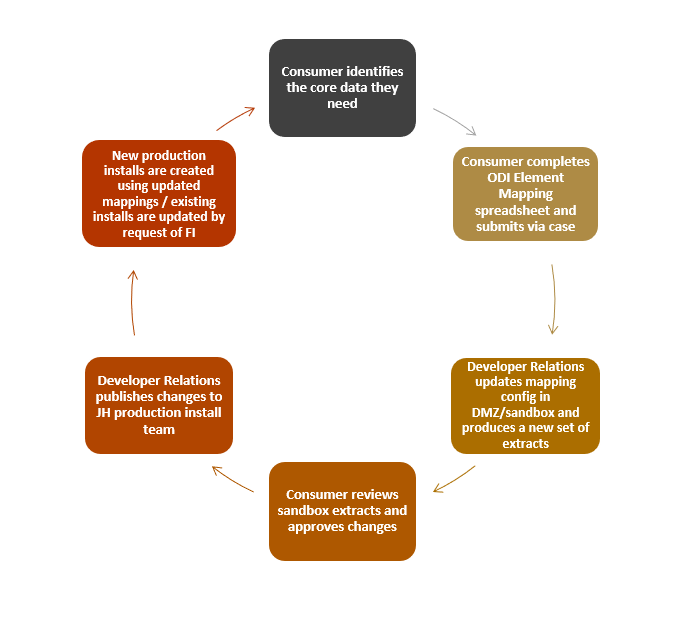
Identifying the Data
First, you’ll need to identify what data will be useful to your consumer application. You can find the full list of available extracts for Silverlake, CIF2020, and Core Director in the ODI Extracts section of this portal. Each extract page contains summary info, element names, and core file and fields mappings. Your first job as a new consumer will be to review the documentation and identify what extract files and data elements you need.
As part of that process, you’ll need to complete one or more of the ODI Element Mapping spreadsheets, listed below. Update the Selection for Consumer column to “Yes” for the fields you need.
- ODIElementMapping_SL_ConsumerVersion (Silverlake)
- ODIElementMapping_CIF2020_ConsumerVersion (CIF2020)
- ODIElementMapping_CD_ConsumerVersion (Core Director)
Next, fill out our Operational Data Integration Interest Form and you’ll receive an email with next steps in the process.
Testing and Making Changes
We’ll use the Element Mapping files to create an ODI integration for you in our DMZ development environment, and get you access to the data. We recommend that new consumers receive and compare several sets of extracts to ensure you have the full picture of your data set.
It’s best to identify all the data you need in the development environment before moving on to production. New installations for the production environment may have a backlog, so taking time up front to verify you have everything will help avoid delays later.
If you do have changes, send us an updated Element Mapping spreadsheet and we’ll iterate the process until everything is just right.
Moving to Production
Once you’ve verified the data, we’ll document your setup and publish a new set of data transforms (templates) that can be applied to one or more institutions. We’ll clear your product for install and your partner bank(s) can start opening install cases.
See ODI Integration Phases for more detailed information on the development process.