Configuration
Authenticating users through Jack Henry Identity requires an External Application configuration to be created within the Users & Groups application in Banno Admin. Each product will need an External Application for each institution it supports.
What if a financial institution needs Jack Henry Identity but doesn’t use Banno?
That’s okay! Every financial institution using products integrated to Jack Henry Identity will get the Users & Groups app. This is where you’ll provision OAuth clients (through External Applications), invite users, send password reset links, and more.
For financial institutions who already have Banno Online, there should already be one or more back office administrators. For financial institutions who do not have Banno, a part of the Jack Henry Identity onboarding process will be setting up this new app for you and empowering your administrators with access.
Setting up the environment
If you are a financial institution or working directly with a financial institution, you should work with the back office administrator at your institution to get appropriate access to the Admin API.
If you are a fintech or other developer working without a financial institution, you are likely using the JackHenry.Dev developer portal. In this case, you will not have access to the Banno Back Office.
The back office administrator at your financial institution can do this for you in the Users & Groups section of Banno Admin.
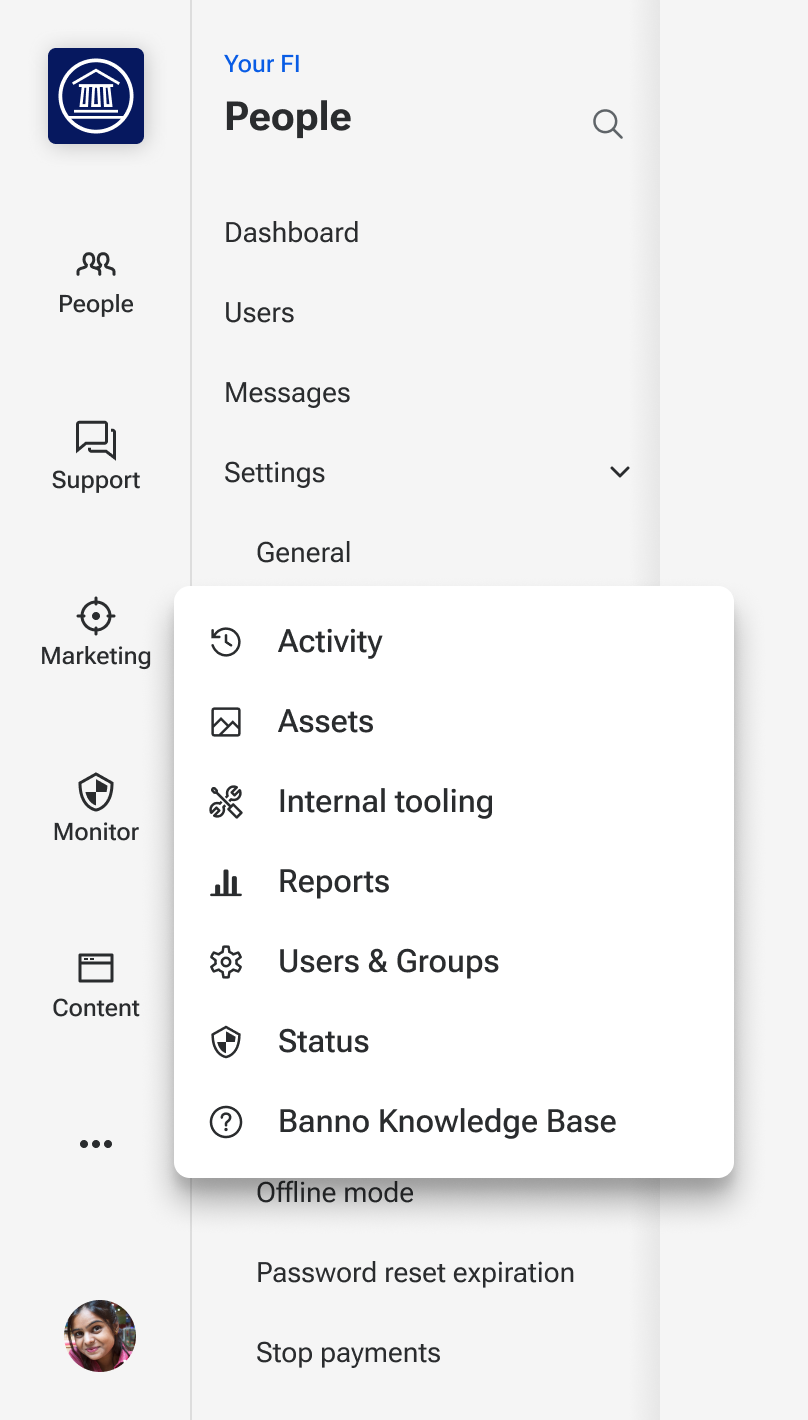
From the Banno Admin dashboard, click the … button to open the menu and select Users & Groups.
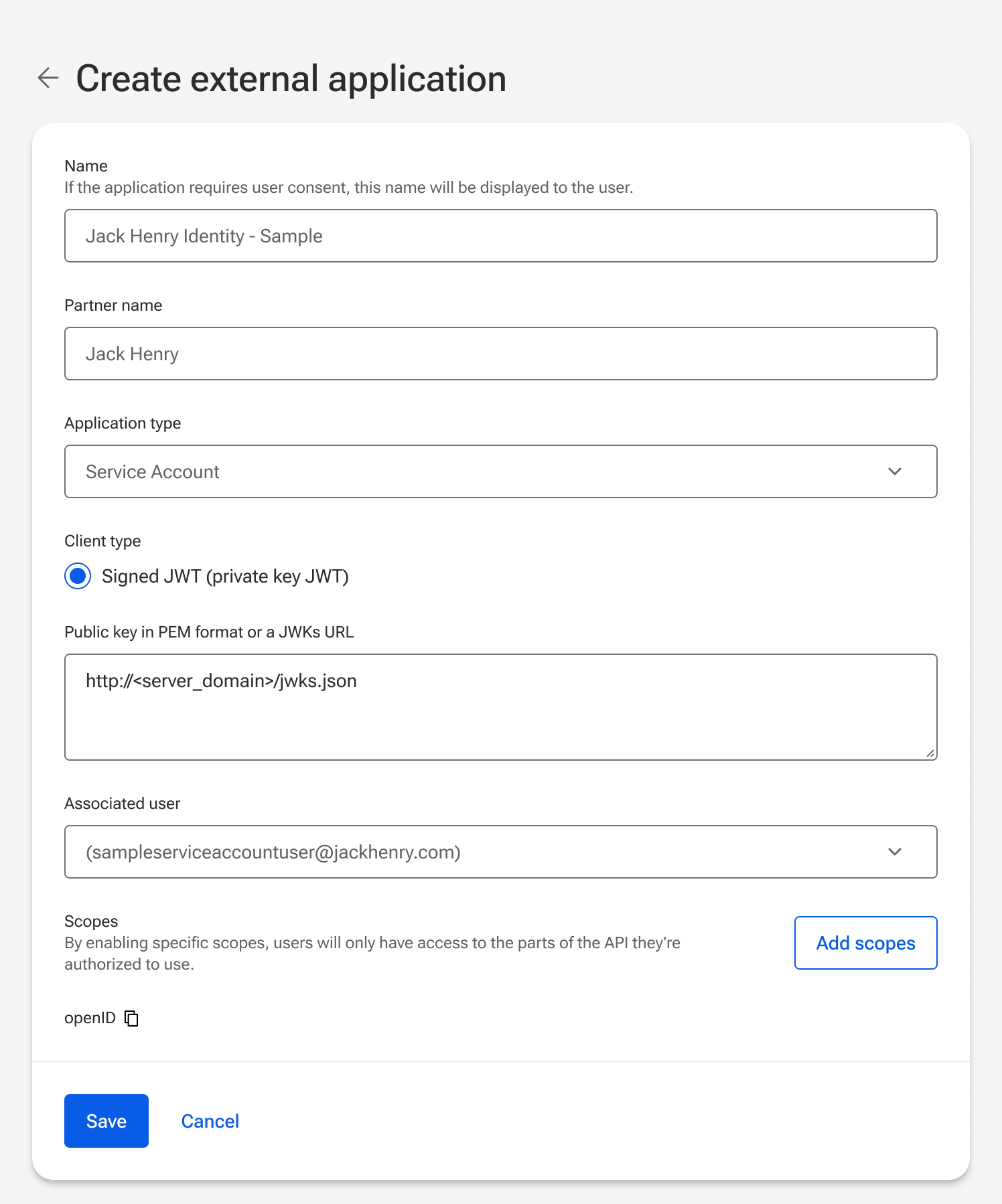
Click the + Create external app button and you’ll be able to fill in the initial values.
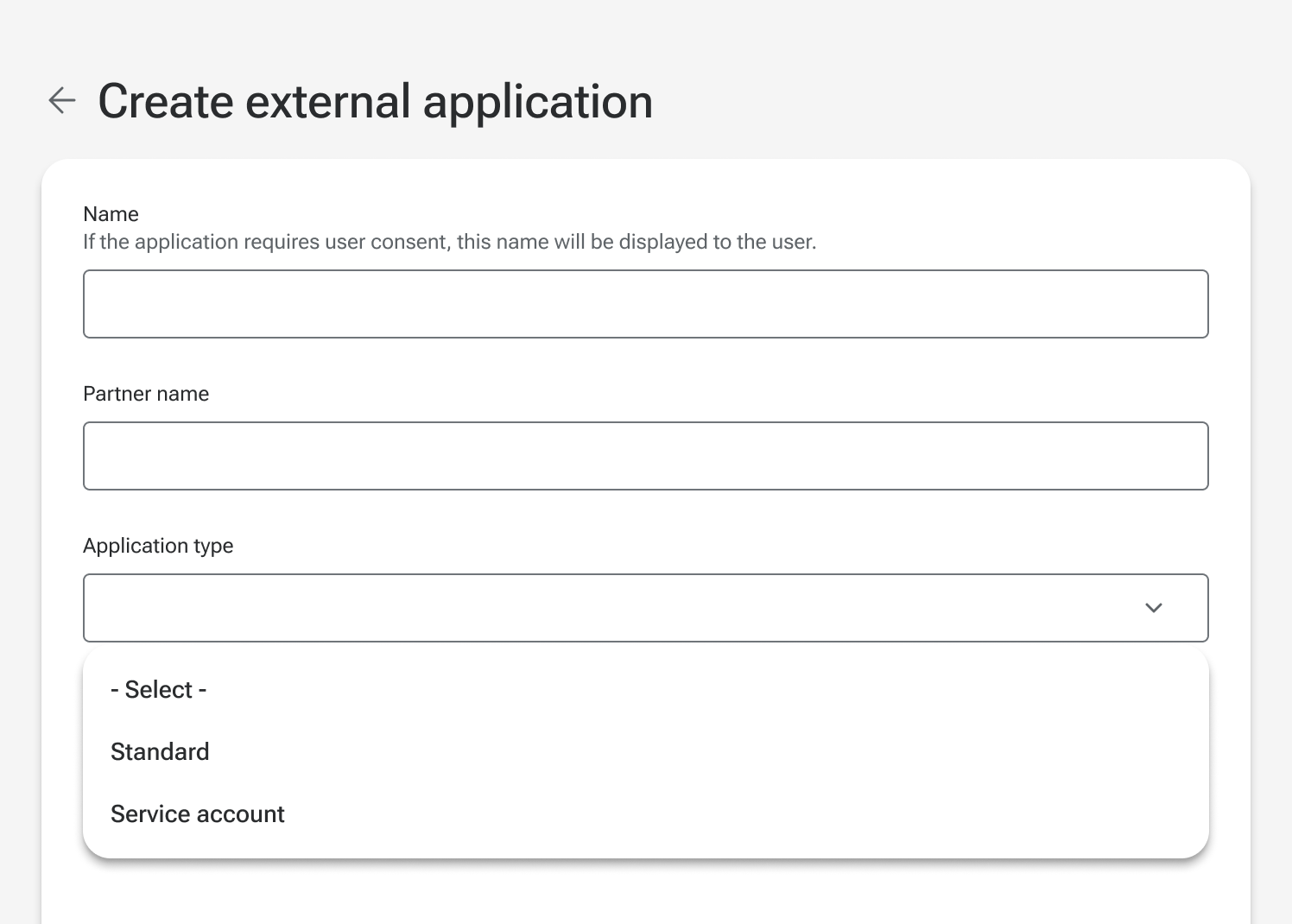
Name: The name of the External Application. For example “Jack Henry Identity - Banno” or “Jack Henry Identity - LoanVantage”.
Partner Name: The name we use to monitor and track integrators. (For JH products integrating with Jack Henry Identity, use Jack Henry.)
Application Type: There are two different application types, standard and service account.
Which Application type do I need?
- Authorization Code flow (for people logging in) = Standard
- Client Credentials flow (for service-to-service authentication) = Service Account
Authorization Code Flow (Standard application type)
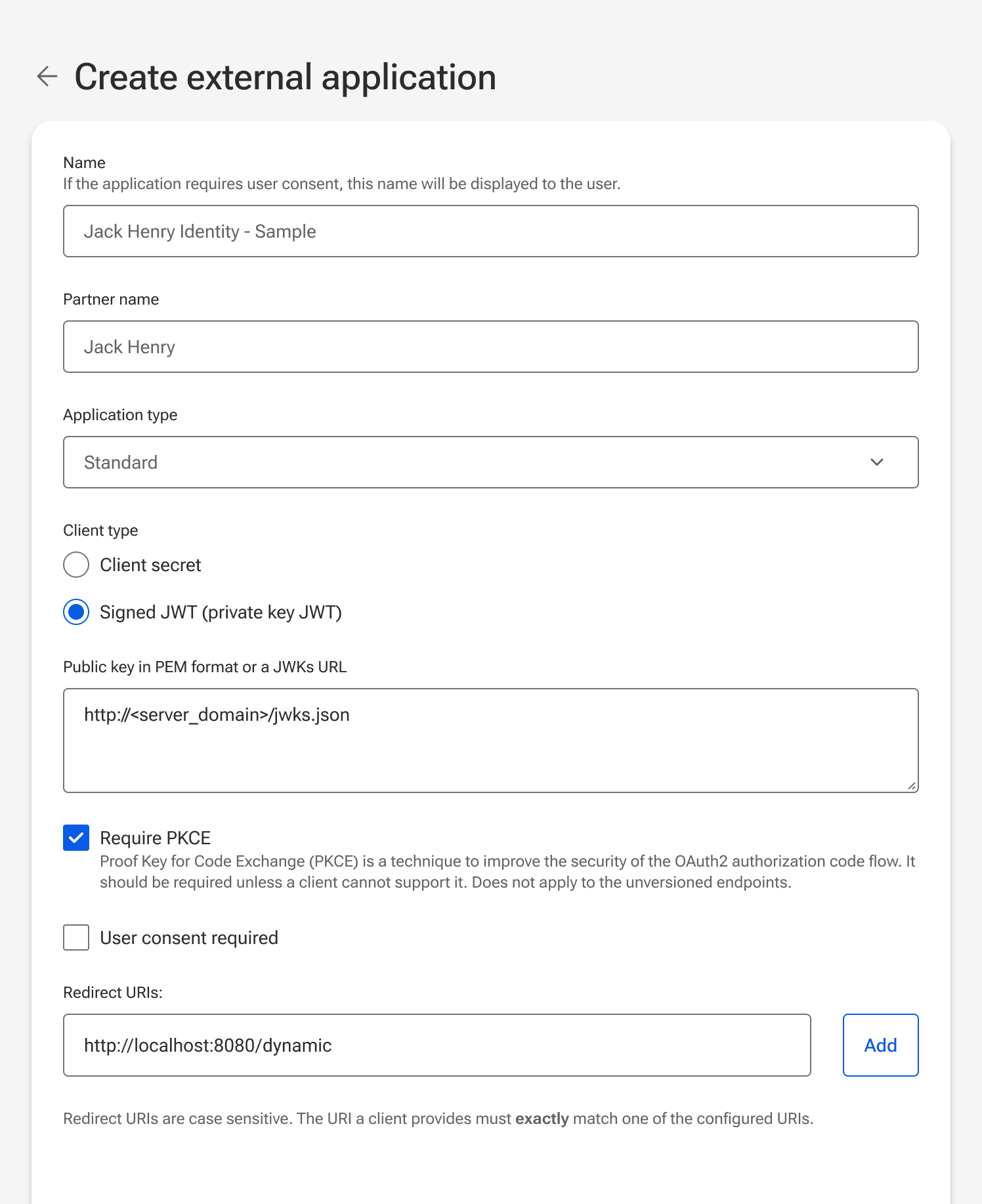
Authentication Method
Choose between a client secret or signed JWT (private key JWT).
- A client secret will be generated and displayed after the external application has been saved.
- Public keys can be provided in PEM format, or as a JWKS URL.
JWKS URL
If providing your public key as a JWKS URL, there are two requirements:
- JWKS URLs must be accessible via a public-facing web server (ie. the web server must be accessible via the public internet and cannot require a specific network or VPN).
- The JWKS URLs must use https.
More information about generating and managing public/private key pairs can be found in Client Authentication Keys.
PKCE required
PKCE (Proof Key for Code Exchange) is required. Not using PKCE will no longer be supported in the near future.
User consent required
This setting is not yet supported. Only trusted use cases should be allowed.
Redirect URIs
These are the Redirect URIs that will be used to return users to your client as part of the Authorization Code Flow for the Standard application type. For products using the OIDC logout feature, the post_logout_redirect_uri must be configured as a redirect URI on the external application.
Each Redirect URI is matched using exact string matching. If the Redirect URI does not match, then the authorization flow will not be valid.
- Redirect URI matching is case-sensitive and path-inclusive, so
http://localhost:8080/dynamicis NOT the same ashttp://localhost:8080/Dynamicand NOT the same ashttp://localhost:8080/dynamic/. - ‘Wild card’ Redirect URI formats are not allowed, so
https://*.example.comis NOT valid.
Redirect URIs must use HTTPS except in local development. HTTPS is required for all production redirect URIs to properly secure the connection between your application and our API.
The only exception is for local development. The following is a list of local options which are included in the HTTP allowlist:
- Host names of localhost or those that end in .local
- Any address in the IPv4 range of 127.0.0.0/8, 10.0.0.0/8, 172.16.0.0/12, or 192.168.0.0/16 (which includes http://127.0.0.1)
Scopes
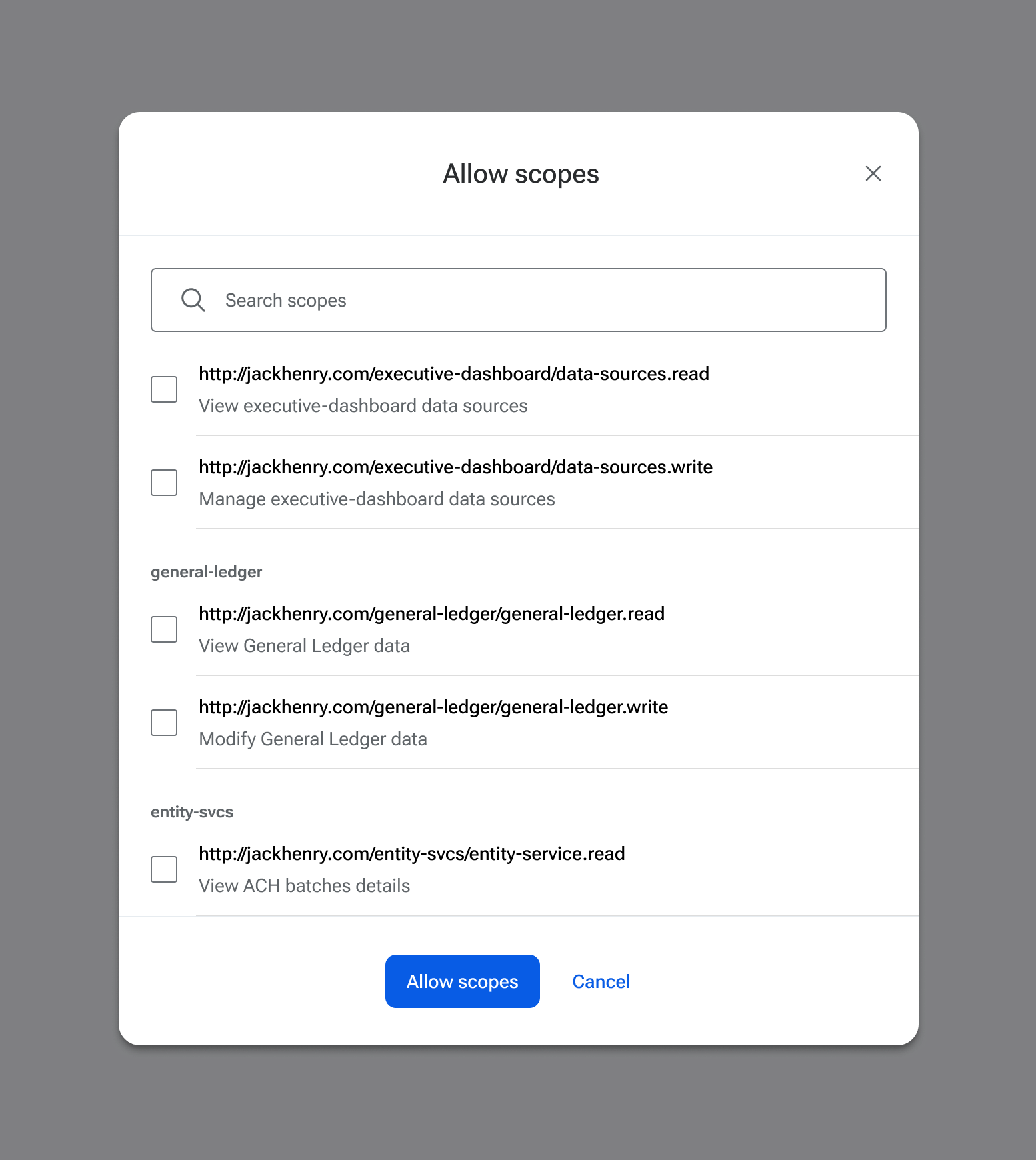
Enabling specific Scopes, applications will only have access to the parts of Jack Henry API they’re authorized to use. Scopes enforce the security principle of “least privilege,” meaning that applications are given only the minimum set of scopes required to perform their intended tasks.
That always includes the openid scope but all others must be manually assigned, and will vary per product. For some products, API scopes will not appear (based on how their authorizations work).
More information is available on our General Concepts for Scopes resource page.
Client Credentials (Service application type)
Choose between providing your public key in PEM format or a JWKs URL.
JWKS URL
If providing your public key as a JWKS URL, there are two requirements:
- JWKS URLs must be accessible via a public-facing web server (ie. the web server must be accessible via the public internet and cannot require a specific network or VPN).
- The JWKS URLs must use https.
Associated User
When configuring the external application for a client credentials flow, an Associated User will be required.
Service applications act as this specific user. All actions of this application are restricted by the permissions of the user and logged as being performed by that user.
Principle of least privilege
The principle of least privilege is a key concept in information security.
Which user?
It is recommended to:
- Create a unique user account for each external application.
- Use an email address that won’t be confused with a human, and is unlikely to be removed by mistake (e.g. “ProductNameServiceAccount@example.com”).
The user will need to be invited through Users & Groups in Banno Admin, but does not need to accept the email invitation. Be sure to assign the appropriate permissions to the user, and then it should be ready to associate to your OAuth client through the external application configuration.
Scopes
Enabling specific Scopes, applications will only have access to the parts of Jack Henry API they’re authorized to use. Scopes enforce the security principle of “least privilege,” meaning that applications are given only the minimum set of scopes required to perform their intended tasks.
That always includes the openid scope but all others must be manually assigned, and will vary per product. For some products, API scopes will not appear (based on how their authorizations work).
More information is available on our General Concepts for Scopes resource page.
- Have a how-to question? Seeing a weird error? Get help on StackOverflow.
- Register for the Developer Office Hours where we answer technical Q&A from the audience.